Easy Mail - Email Launcher
- 4.2
- Rating
- 1.00M
- Installs
- Free
- Price

 Analysis by App-foxy
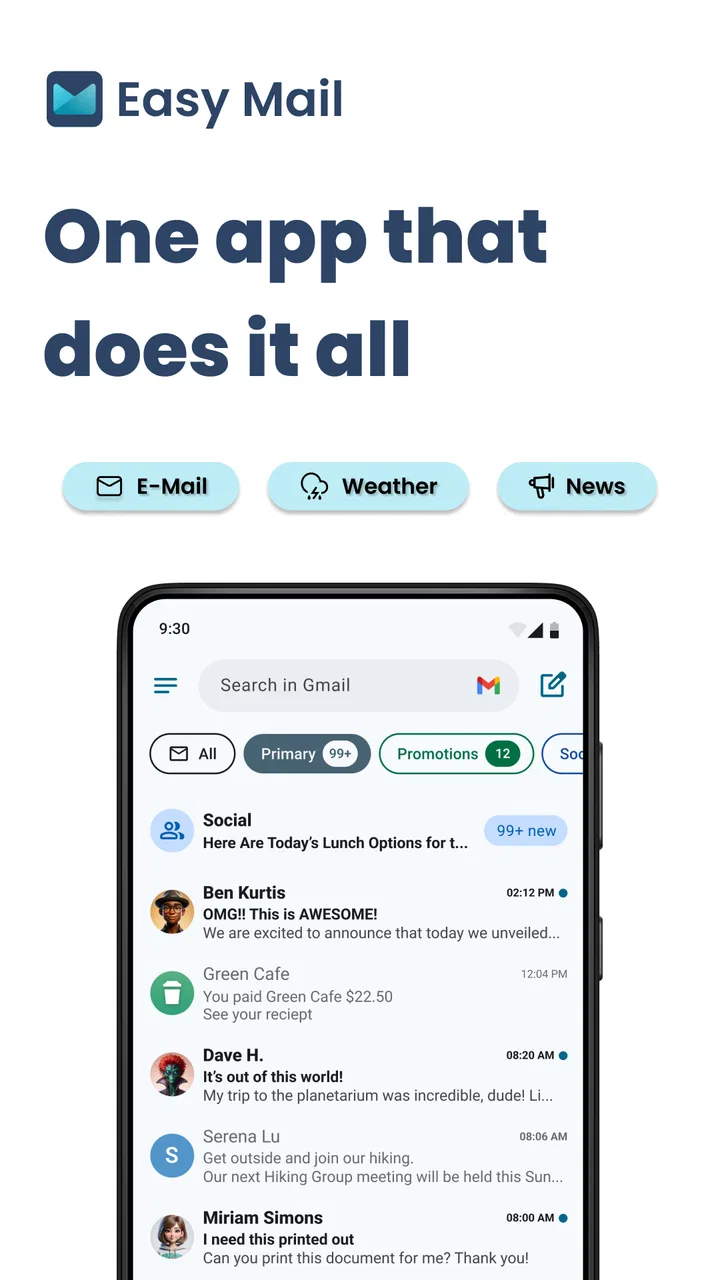
Email usually becomes difficult for a surprisingly small reason: opening it takes just enough effort that I postpone it. Easy Mail - Email Launcher approaches that problem from a personalization angle, placing email access closer to the part of the phone I already use. After trying its swipe-based inbox access, home screen widget, and quick-reply workflow, I found an app designed less for managing every advanced mailbox function and more for reducing the distance between seeing a message and doing something about it.
That distinction matters. This is not trying to replace every full-featured email client. Its appeal is convenience: a faster route into the inbox, a glanceable home screen presence, and short responses when I do not want to compose a complete message. If your email routine is built around quick checks and brief replies, the idea is immediately practical. If you need deep folder management, elaborate filters, or a powerful desktop-style workspace on your phone, you may still prefer your usual mail application.
How the launcher feels in everyday use
The first thing I noticed is that the app changes the starting point of an email session. Instead of treating the inbox as a destination I must deliberately open, it makes access feel like part of the phone’s normal navigation. That can be useful for people who check messages in short gaps: while waiting for a bus, between meetings, or when a notification reminds them to answer something before it slips away.
You May Also Like

 Blood Strike: 2.5 Anniversary
Blood Strike’s Loadouts Turn Every Drop Into a Tactical Gamble
A close look at Blood Strike’s custom loadouts: how fast access to signature weapons reshapes its battle royale rhythm, rewards preparation, and narrows the gap between fights.

 Pandora - Music & Podcasts
Pandora’s Music Is Easy to Start, but Harder to Recover
Pandora’s strength is its low-effort path from a seed to a station. Its weak spot is how much confidence it asks you to place in connection, setup, and quiet recovery.

 8 Ball Pool
 Is Built on Rivalries, Rematches, and Routine
A close look at the rivalries, rematches, shared routines, and unanswered safety questions that turn a quick pool match into a persistent mobile community.

 Samsung Music
’s Quiet Strength Is Playing What You Already Own
Its reach comes less from spectacle than from dependable access to a personal library. That simplicity is both the app’s strongest retention engine and its ceiling.

 AccuWeather: Weather Radar
AccuWeather Review: A Quick, Clear Forecast for Everyday Decisions
For everyday plans, the best forecast is the one you can understand quickly. AccuWeather makes rain timing, radar, and local conditions easy to act on, with a few trade-offs.

 Hill Climb Racing
Why Hill Climb Racing Still Turns Crashes Into One More Run
A tiny car, a bumpy hill and one more upgrade: Hill Climb Racing keeps resurfacing because its simple chaos makes every near-miss feel personal.
More From Our News Desk



The swipe approach has a clear advantage when it becomes familiar. A gesture is quicker than searching through an app drawer, and it can make email feel less interruptive. I also found that this style works best when I use it for a specific purpose, such as checking whether a time-sensitive message arrived or sending a short confirmation. It is less compelling when I am settling in for a long session of sorting, reading attachments, and organizing conversations.
The home screen widget supports the same idea from another direction. Rather than relying entirely on a gesture, I can keep email visible in a place I already scan during the day. The widget is particularly useful for people who want a reminder without opening the full application every time. It also creates a useful choice: use the swipe access when I want speed, or use the widget when I want email to remain visible without actively thinking about it.
Quick replies are the most practical feature for routine communication. Many messages do not need a carefully written answer; they need a simple acknowledgement, confirmation, or next step. Having a fast response path can prevent a small inbox item from becoming an unfinished task. I would still write longer or sensitive replies in a conventional mail interface, where I have more room to review wording before sending.
Where the speed advantage is real
The perceived speed here comes mainly from fewer steps, not from turning email into an instant service. Easy Mail - Email Launcher does not make a slow network connection faster, and it cannot remove delays caused by the mail provider. What it can do is shorten the route from the phone’s home screen to the action I want to take.
That difference is easy to overlook. If I am already inside my normal email app, switching to a launcher adds no value. The benefit appears before that point, especially when I am tempted to ignore email because opening and navigating to the inbox feels like too much effort. In that situation, the shortcut can make checking messages feel lighter and more immediate.
For the best experience, I would place the widget somewhere visible but not so prominent that it dominates the home screen. A crowded widget layout can make the phone feel busier rather than faster. Similarly, the swipe route is worth learning only if it feels natural alongside the gestures I already use. If it conflicts with another navigation habit, the time saved by one action may be lost through accidental swipes or hesitation.
One non-obvious strength is that the app supports different levels of commitment. A widget can serve as a passive reminder, a gesture can provide a quick entrance, and a reply option can finish a small task. I do not have to use every part in the same way. That makes it easier to adapt the setup to my habits instead of forcing a single email routine.
What happens during heavier email sessions
Easy Mail feels most convincing when email is handled in small bursts. During a heavier session, the limitations of a shortcut-focused design become more noticeable. Reading a long chain, comparing several messages, moving between detailed conversations, or preparing a carefully structured reply is still better suited to a conventional email client.
That is not necessarily a weakness in the app’s intended role. A launcher does not need to become a complete office suite to be useful. The important trade-off is knowing when to switch tools. I would use Easy Mail to enter the inbox quickly, clear obvious messages, and answer simple requests. For a larger cleanup session, I would move to the main email application where the broader set of controls is easier to manage.
The same principle applies when several messages arrive close together. Quick replies can help me remove simple items from the mental queue, but speed can also encourage careless responses. I would pause before using a preset-style answer for anything involving dates, commitments, customers, or personal information. Fast handling is valuable only when it does not create a second task later.
A useful workflow is to separate “action now” from “review later.” I can use the shortcut to deal with messages that need a short acknowledgement, then leave complicated conversations for a focused session. This prevents the app from becoming a reason to skim everything without actually resolving important email.
Stability and recovery when something interrupts the flow
For an app like this, reliability is not only about whether the interface opens. It is also about whether the shortcut remains understandable when I return to the phone after a distraction. The simpler the intended action, the easier it is to recover: open the inbox, identify the message, and decide whether to reply now or continue elsewhere.
In ordinary use, I would judge the experience by how consistently the access method matches my expectations. A gesture-based tool needs a little patience during the learning stage because muscle memory develops over time. The widget offers a more visible fallback, which is helpful if I forget the gesture or prefer not to rely on it in a particular situation.
Recovery is also important after an interrupted reply. A phone call, notification, or quick switch to another application can break concentration. For that reason, I would avoid beginning a complicated message through the quick-reply path. The feature is strongest when the answer is short enough to finish immediately. For anything that requires drafting, checking facts, or attaching material, the regular mail workflow is the safer choice.
I also appreciate that the app’s role is easy to understand. It is not asking me to rebuild my entire communication system. That makes it easier to keep as a convenience layer while retaining a familiar email client for more demanding work. If the launcher does not suit a particular situation, I can simply use the normal route instead of having to migrate all my accounts and habits.
Resource expectations and phone compatibility
Easy Mail is available as a free personalization app from App Lab Studios, with optional in-app purchases ranging from $9.99 to $59.94 per item. The free entry point makes it reasonable to test the workflow before deciding whether the additional purchase options are worthwhile for my own use. I would not pay simply because a shortcut sounds convenient; I would first check whether I actually use the gesture, widget, and quick replies during a normal week.
The app is aimed at devices running Android 10 or later. That requirement is worth checking before installation, especially if the phone is older or has been kept on an earlier system version. On a compatible device, the main question is not raw power but whether the phone’s home screen and gesture habits leave room for another personalization layer.
Because the app is built around access rather than heavy content creation, its perceived resource demand should be considered in context. The usefulness comes from being available at the moment I want email, so a setup that is hidden, restricted, or constantly displaced by other home screen elements would reduce its value. I would keep the arrangement simple and observe whether it genuinely saves steps instead of adding another item to maintain.
The Teen content rating is also relevant for households where app choices are being reviewed by a parent or guardian. It does not change the app’s basic purpose, but it is part of the decision when installing personalization tools on a shared or younger user’s device.
Who will get the most from it
I think Easy Mail is a strong fit for people who receive many short, low-complexity messages. A freelancer confirming appointments, a student answering quick administrative questions, or a busy worker acknowledging internal updates may find the reduced friction useful. The app is also appealing if the main problem is not email volume but procrastination: seeing the inbox and replying quickly can be easier when the route is always close at hand.
Here is a realistic example. I might be leaving home when a message arrives asking whether I can attend a meeting. Instead of opening the app drawer, locating my email client, and navigating through the inbox, I use the shortcut, read the request, and send a brief confirmation. Later, when I have time, I can handle the messages that need more thought through the standard client. That division keeps a small task from occupying my attention all day.
The app is less suitable for someone whose email life depends on detailed organization. If I regularly manage labels, complex folders, multiple accounts, long threads, or extensive attachments, a full email client remains the better primary tool. Easy Mail may still work as an entry point, but I would not expect it to replace the deeper controls I rely on.
It may also be a poor match for people who dislike gestures or keep a very minimal home screen. In that case, the widget can feel like visual clutter, while the swipe access may never become automatic. A conventional email icon is simpler and may be faster for someone whose existing routine is already efficient.
How it compares with ordinary email apps
Compared with a standard email client, Easy Mail focuses on the moment before inbox management begins. Traditional apps generally offer more complete tools for searching, sorting, composing, and handling account settings. Their strength is control. This app’s strength is reducing the effort needed to get started.
Compared with a generic home screen widget, it is more specifically organized around email access and quick responses. That focus can be useful if I want the phone to encourage one particular habit rather than display a broad collection of information. The trade-off is that a general widget or the default mail shortcut may already be enough for someone who only checks email occasionally.
The most sensible comparison is therefore not “which app replaces the other?” but “which part of my routine needs improvement?” If I need a faster doorway, Easy Mail makes sense. If I need a complete workspace, my established email client is more appropriate. Using both can be practical, provided the extra layer genuinely saves time instead of making notifications and entry points harder to understand.
Version, maturity, and the decision to install
The current version is 1.02.36, and the app was released on Nov 22, 2023. I would treat it as a focused tool whose value depends heavily on personal fit rather than as an all-purpose email replacement. Its average rating is 4.2 from around 14K ratings, with roughly 3.5K written reviews, while installs have passed the one-million mark. Those figures suggest that the concept has found a substantial audience, but they do not remove the need to test whether the interaction suits my own phone habits.
The free price is a useful advantage because the decision can begin with actual daily use rather than a commitment. I would set up one access method first, use it for several days, and then decide whether the widget or quick replies improve the routine. That approach also makes it easier to notice friction early: accidental gestures, a widget that gets ignored, or a reply flow that feels too limited for the messages I receive.
My main caution is that convenience features can become unnecessary layers. If I already open my email app without hesitation, Easy Mail may not change much. If email is repeatedly postponed because it feels inconvenient to reach, the launcher has a clearer job and is more likely to earn its place on the phone.
Overall, I see Easy Mail - Email Launcher as a practical shortcut for people who want email to be easier to reach, not as a replacement for a full communication suite. Its best qualities are the combination of swipe access, a home screen widget, and quick replies, especially when I use each one for a different kind of task. Its limitations appear during long, detailed, or highly organized email sessions, where a traditional client remains more capable.
My performance verdict is simple: the app feels most useful when the problem is friction at the starting line. It can make brief checks and short answers feel quicker, while its lightweight role keeps the workflow understandable. I would recommend trying the free version to anyone who regularly delays simple email, but I would skip it if advanced inbox management is the main reason I use email. For the right user, it is a small personalization change that can make a surprisingly ordinary task easier to begin and finish.
FAQs for Easy Mail - Email Launcher
01What is Easy Mail - Email Launcher and how does it work?
Easy Mail - Email Launcher is an app designed to streamline your email experience on Android and iOS devices. It acts as a central hub where you can access, manage, and send emails across multiple accounts from a single interface. Its intuitive design and smart filters make email management efficient and hassle-free.
02Does Easy Mail - Email Launcher support multiple email accounts?
Yes, Easy Mail - Email Launcher supports multiple email accounts, allowing users to manage all their emails in one place. Whether you have Gmail, Outlook, Yahoo Mail, or other accounts, you can easily integrate them and toggle between accounts without needing to log in and out repeatedly.
03Is Easy Mail - Email Launcher secure for handling sensitive information?
Security is a top priority for Easy Mail - Email Launcher. The app uses encryption to protect your data and provides security features such as biometric authentication and two-factor authentication support. Always ensure you download the app from official sources to avoid security risks.
04What features does Easy Mail - Email Launcher offer to enhance productivity?
Easy Mail - Email Launcher offers a variety of productivity-enhancing features, including smart filters for organizing emails, customizable notifications, quick reply options, and integrated task management. These tools are designed to help users handle their emails efficiently and stay on top of important tasks and deadlines.
05Are there any in-app purchases or ads in Easy Mail - Email Launcher?
Easy Mail - Email Launcher offers a free version with basic features and may display ads. For an ad-free experience and access to premium features, users can opt for in-app purchases. The premium version often includes advanced customization options and priority customer support.
Pros
- Intuitive interface for quick navigation.
- Supports multiple email accounts seamlessly.
- Customizable themes enhance user experience.
- Efficient spam filter reduces clutter.
- Offline access to emails is a plus.
Cons
- Limited integration with third-party apps.
- Occasional syncing issues with some accounts.
- Ads can be intrusive in the free version.
- Lacks advanced email management features.
- Limited support for non-standard email providers.

Easy Mail - Email Launcher
Gallery